
Email Size: What Affects the Weight of Email Campaigns and How to Optimize It
An email campaign is much more than just text and visuals. Under the hood, there’s always the template’s code that determines how the message is built, delivered, and rendered in the inbox. Among the most important technical parameters is email size, also called its weight.
But what does the term “email weight” actually mean, and what should you pay attention to so that the technical implementation remains aligned with the creative concept? Let’s break it down.
What Counts Toward Email Size
To put it simply, email weight is the size of its HTML part. If an AMPHTML part is used, it’s also taken into account. This is strictly the number of bytes in the code, not how many “screens” the email takes up visually. A short-looking message can be heavy in code, and vice versa, a long one can be surprisingly light.
Two emails that look almost identical at a glance may differ in weight depending on how they were built. Size is mainly influenced by:
- HTML markup (tables, wrappers, nested blocks, comments);
- CSS (rules inside
<style>plus inline styles in element attributes); - text content (headings, paragraphs, buttons, footnotes);
- links, tracking pixels, and hidden technical blocks.
Images and animations are not included in this weight calculation. Email clients fetch media separately after they process the markup. Still, media optimization matters, because file size affects what the recipient sees in the first seconds after opening:
- Large images take longer to load, especially on slow connections and in image-heavy emails.
- Until images load, recipients see blank areas or placeholders.
- If the main visual component appears too late, the first impression suffers.
So even though graphics don’t add to the HTML weight, optimizing them remains an important part of solid email production.
What Limits the Maximum Email Size
Gmail’s HTML Size Limit
Many email clients don’t have a strict maximum email size. Gmail is one of the notable exceptions: it caps the HTML part at 102 KB.
If this threshold is exceeded, Gmail automatically clips the email and hides the lower portion behind a “View entire message” link. The full content becomes visible only after the recipient takes an extra action.
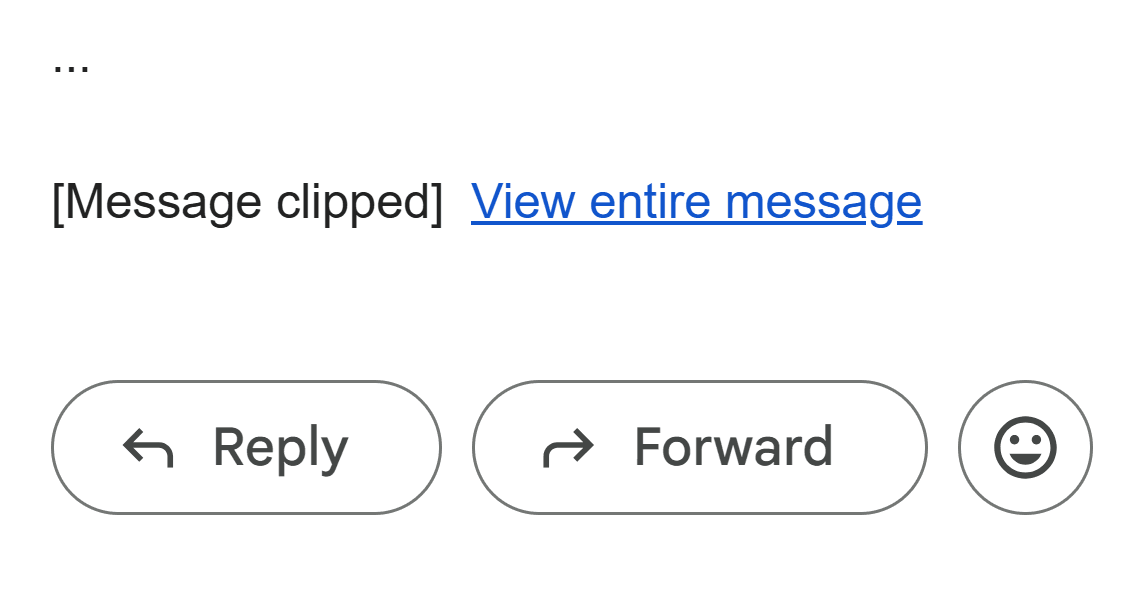
As a result, this may affect both user experience and email performance:
- Even if only the footer gets clipped, that’s where contact info, legal text, and the “Unsubscribe” link are often located. If recipients can’t quickly find a clear way to opt out, the “Report spam” button becomes one of the few remaining options.
- Tracking pixels that detect email opens are typically placed near the bottom of an email as well. If that section is clipped and not displayed, opens won’t register and analytics will become distorted. On top of that, if an automated communication sequence depends on whether the email was opened or not, errors will ripple through subsequent steps.
AMP Size Limits
AMP content has its own constraints, defined in the AMP for Email specification:
- AMPHTML part: up to 200,000 bytes (about 195 KB).
- CSS inside
<style amp-custom>: up to 50,000 bytes (about 48 KB).
If either limit is exceeded, the AMP content will fail validation, and the recipient will see the HTML version of the email instead. It’s important to note that these limits are set by the format itself and are checked at the AMP code validation stage.
Spam Filtering
Email clients and anti-spam systems evaluate email campaigns using a number of signals, including code-related ones. Common factors include:
- HTML markup structure and complexity;
- ratio of meaningful content to technical elements;
- number of trackers and links;
- attachments and the way they’re embedded.
Suspicion is triggered not by the email size itself but rather by the reasons it becomes heavy: bloated markup, excessive tracking, and overly complex, tangled nesting. In those cases, sending large volumes of the same email amplifies the overall negative signals during scoring.
This matters even more for bulk email campaigns. When the same “heavy” email is delivered to a large number of recipients, signals accumulate faster, which in turn affects deliverability and sender reputation.
What Are Practical Ways to Reduce Email Weight
Remove Unnecessary HTML Elements
Small details in the code can add up to a noticeable share of the email’s weight:
- extra spaces and tabs used to visually align the code;
- line breaks that don’t affect rendering but increase the email size;
- blank lines between content blocks that remain after edits or copying.
These elements don’t change the final look of an email. Therefore, at the final stage it’s worth minifying the markup: carefully removing the unnecessary fragments without changing structure or design, which can reduce the email by several kilobytes.
Simplify the Table Structure
Tables (<table>, <tr>, <td>) are one of the core tools in email development and the backbone of email layout. They ensure stable and consistent rendering across various email clients.
Still, table misuse can significantly increase code size. For example, extra weight may appear due to:
- Excessive nesting: tables are nested without any actual need or reason.
- Duplicate wrappers: the same content is repeated across multiple tables or cells.
Practical optimization approaches include:
- Reduce nesting depth: if multiple table layers perform the same role, consider merging them. This reduces code size while keeping rendering stable.
- Use
paddingon table cells: creating separate tables and rows just for additional spacing eventually bloats markup. In those cases, it’s preferable to set spacing viapaddingon<td>.
Even small but careful structural cleanups can noticeably reduce code weight, especially in long email layouts.
Remove “Dead Code”
Templates that went through several stages of development and testing often accumulate leftover code fragments that are no longer used but remain in the email, increasing its size. Examples include:
- commented-out blocks from earlier versions of an email;
- fragments related to already completed A/B tests;
- hidden elements that don’t affect rendering or logic.
Removing unused code reduces size and makes the template easier to maintain. But it’s better to act with caution: some hidden elements may be required for preheaders, fallback logic, or personalization. Remove only what you’re certain is unused.
Clean Up CSS
CSS has a noticeable impact on email size, especially after multiple rounds of edits. In this case, typical causes for extra volume include:
- repeated sets of CSS properties assigned to a number of elements without actual need;
- rules and classes left behind from older versions;
- auto-generated inline styles where every block gets the same set of properties.
Optimization comes down to regular style reviews: remove unused rules and reduce repetition. For AMP emails, CSS control is particularly important because of strict size limits.
Use TJML for Email Development
TJML is a framework created by the Pixcraft team to make email development faster and more comfortable. It allows for creating both HTML and AMP emails using a single code base, while the resulting templates remain stable across most email clients, including Microsoft Outlook 2003–2024.
For email weight control, TJML offers the following mechanics:
- Size checks: the framework can calculate code size and warn the user when recommended thresholds are exceeded, providing the opportunity to fix issues before test sends and final builds.
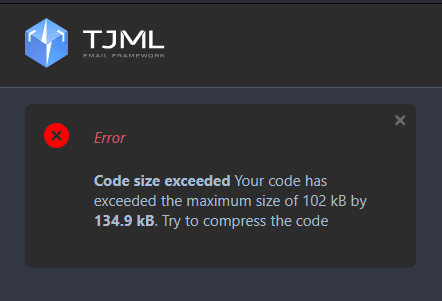
- Code optimization: TJML comes with a function to remove extra spaces and redundant elements that don’t affect rendering. As a result, you get a smaller email template that still renders correctly.
Read this article to learn more about the TJML framework, its features, and how it speeds up email development.
Check Email Size After the Final Build
During the sending stage, ESPs and CDPs typically wrap links in tracking redirects. Each link gains extra parameters, making it longer and increasing the overall markup size. Therefore, an email that fits the limits during development may exceed them after processing.
A reliable approach here is to send a test email and inspect the message in its “finalized” form. This helps reduce the risk of Gmail clipping and AMP validation errors.
Conclusion
Email weight isn’t a theoretical metric. It impacts analytics, deliverability, and how a campaign is perceived after it’s opened. Treat size control as part of template production: organize markup and CSS, and verify the final HTML after your ESP or CDP processes it.